跳到主要内容

PhenoHUB - Transformation of mobile results of Digital Plant Phenotyping Platform

· 阅读需 6 分钟
Liangchao Deng
Ph.D. Candidate @ SHZU @CAS-Cemps

Project Overview

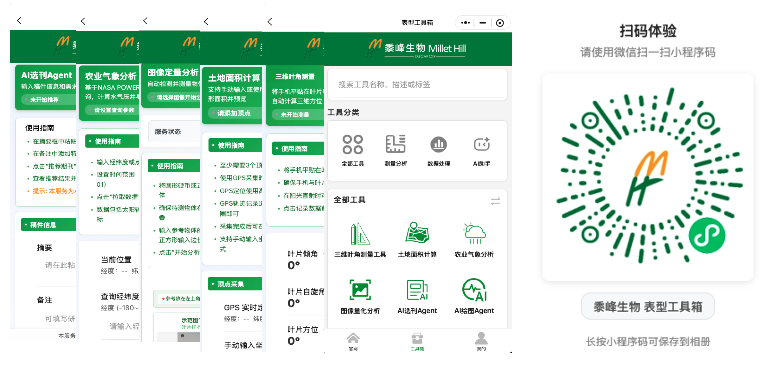
PhenoHUB is a WeChat Miniapp focused on plant photosynthetic phenotyping research, integrating multiple scientific tools and AI analysis functions to help researchers quickly obtain and analyze plant phenotyping data in the field.

PhenoHUB Main Interface
Main Interface

Core Function Modules

Phenotyping Measurement Tools

Leaf Angle Measurement - Precise leaf angle measurement based on device sensors

  • Utilizes mobile phone gyroscope and accelerometer
  • Real-time angle display and recording
  • Supports batch measurement of multiple leaves

Land Area Calculation - GPS-based farmland area measurement tool

  • High-precision GPS positioning
  • Real-time trajectory tracking
  • Automatic area calculation and unit conversion

Image Quantitative Analysis - Intelligent analysis and feature extraction of plant images

  • Image processing based on OpenCV
  • Leaf area and chlorophyll content estimation
  • Supports batch image processing

AI Intelligent Analysis

AI Drawing Agent - CSV data intelligent visualization, supporting 8 professional chart types

  • Bar charts, ANOVA analysis charts, heatmaps, line charts
  • Histograms, violin plots, scatter plots, radar charts
  • Smart data validation and anomaly detection
  • One-click generation of high-quality charts suitable for paper publication

AI Academic Assistant - Research paper writing and data analysis assistance

  • Experimental design suggestions
  • Data analysis method recommendations
  • Paper writing guidance

Environmental Monitoring

Agricultural Meteorology - Real-time weather data and agricultural meteorological indicators

  • Temperature, humidity, light intensity
  • Soil moisture monitoring
  • Agricultural meteorological index calculation

Location Services - Precise geographic location and altitude measurement

  • GPS/BeiDou dual-mode positioning
  • Altitude measurement
  • Geographic coordinate conversion

Data Management

Data Import/Export - CSV format data processing support

  • Excel/CSV file import
  • Data cleaning and preprocessing
  • Batch export functionality

Statistical Analysis - Built-in professional statistical analysis functions

  • Descriptive statistics
  • Hypothesis testing
  • Regression analysis

Report Generation - Automatic generation of analysis reports and charts

  • One-click PDF report generation
  • Automatic chart layout
  • Supports custom templates

Technical Architecture

Frontend Technology Stack

WeChat Miniapp Native Development

  • Based on WeChat Miniapp framework
  • Supports iOS and Android platforms
  • No installation required, ready to use

UI Library: TDesign Miniprogram v1.8.6

  • Professional mobile UI component library
  • Unified design language
  • Excellent user experience

Chart Libraries

  • Canvas API (local rendering) - Lightweight charts
  • ECharts for Weixin v1.0.2 - Professional charts
  • Supports interactive charts

Styling: LESS Preprocessor

  • Improves development efficiency
  • Strong code maintainability
  • Supports variables and mixins

Backend Services

Python FastAPI

  • High-performance API services
  • Asynchronous processing support
  • Good scalability

AI Model Integration

  • Supports multiple AI analysis models
  • Intelligent data processing
  • Continuous learning optimization

Data Processing Engine

  • Professional statistical analysis
  • Big data processing capabilities
  • Real-time computing optimization

Project Structure

PhenoHUB/
├── pages/ # Page files
│ ├── hub/ # Toolbox homepage
│ ├── web/ # Official website display
│ ├── leafAngle/ # Leaf angle measurement
│ ├── landArea/ # Land area calculation
│ ├── agriWeather/ # Agricultural weather
│ ├── imageQuantitativeAnalysis/ # Image quantitative analysis
│ ├── aiImage/ # AI Drawing Agent
│ ├── aiJournal/ # AI Academic Assistant
│ └── my/ # Personal center
├── components/ # Custom components
├── utils/ # Utility functions
├── static/ # Static resources
├── Backend code/ # Backend service code
└── docs/ # Project documentation

Feature Highlights

Professionalism

  • Professional tools designed specifically for plant phenotyping research
  • Data formats and analysis methods compliant with scientific standards
  • Supports multiple statistical analysis and visualization requirements
  • Compatible with international mainstream research tools

Portability

  • Based on WeChat Miniapp, no installation required
  • Supports offline data collection and online synchronization
  • Suitable for mobile operations in the field
  • Cross-platform compatibility, covering iOS and Android

Intelligence

  • Integrated AI analysis capabilities, automatic chart and report generation
  • Smart data validation and anomaly detection
  • Provides scientific writing and data analysis suggestions
  • Continuous learning, continuous function optimization

Visualization

  • 8 professional chart types to meet different analysis needs
  • Supports interactive charts and data exploration
  • High-quality chart export suitable for paper publication
  • Real-time data visualization, intuitive result display

Use Cases

University Research

  • Plant physiology experiment data collection
  • Crop phenomics research
  • Agricultural ecology field surveys

Agricultural Enterprises

  • Variety breeding process monitoring
  • Farmland management decision support
  • Yield prediction and optimization

Research Institutions

  • Large-scale phenotyping data collection
  • Cross-regional variety comparison
  • Climate change impact research

Quick Start

Environment Requirements

  • WeChat Developer Tools (latest version)
  • Node.js >= 14.0.0
  • WeChat Miniapp base library >= 2.6.5

Installation Steps

  1. Clone Project
git clone https://git.weixin.qq.com/Smiler488/PhenoHUB.git
cd PhenoHUB
  1. Install Dependencies
npm install
  1. Developer Tool Configuration
  • Open WeChat Developer Tools
  • Import project directory
  • Build npm packages: Tools → Build npm
  • Preview or real-device debugging

Backend Service Deployment

  1. Python Environment
cd "Backend code"
pip install -r requirements.txt
  1. Start Service
python main.py

Development Status

Core Function Modules (90% complete)

  • Basic measurement tools implemented
  • AI drawing function basically complete
  • Data management module perfected

UI Interface Design (100% complete)

  • Unified design language
  • Excellent user experience
  • Responsive layout

Data Processing Engine (95% complete)

  • Statistical analysis functions
  • Data import/export
  • Report generation

AI Service Integration (70% complete)

  • Basic AI model integration
  • Continuous optimization in progress
  • New function development

Backend API Development (60% complete)

  • Basic API interfaces
  • Performance optimization in progress
  • Security enhancement

Performance Optimization (Planned)

  • Response speed optimization
  • Memory usage optimization
  • Offline function enhancement

Technical Highlights

Data Flow Optimization

  • Local caching mechanism to reduce network requests
  • Smart data synchronization strategy
  • Offline resume functionality

Data Security

  • Local data encryption storage
  • Transmission data encryption
  • User privacy protection

User Experience

  • Smooth animation effects
  • Intuitive operation flow
  • Detailed usage guidance

Scalability

  • Modular design, easy to extend
  • Plugin-based architecture
  • Supports custom functions

Future Plans

Short-term Goals (2026 Q1)

  • Improve AI service integration
  • Optimize backend API performance
  • Add more chart types
  • Perfect user feedback system

Medium-term Goals (2026 Q2-Q3)

  • Integrate more AI models
  • Support multilingual interface
  • Develop desktop application
  • Establish user community

Long-term Vision

  • Become the standard tool for plant phenotyping research
  • Support global multilingual versions
  • Establish an open data ecosystem
  • Promote digital transformation of agricultural research

Contribution Guide

Welcome to submit Issues and Pull Requests to improve the project.

Development Standards

  • Follow WeChat Miniapp development standards
  • Use ESLint and Prettier for code formatting
  • Run npm run lint:fix before submission

Submission Process

  1. Fork the project
  2. Create a feature branch
  3. Submit changes
  4. Initiate Pull Request

License

This project adopts the MIT License.


Contact Us

  • Project Repository: https://git.weixin.qq.com/Smiler488/PhenoHUB.git
  • Issue Feedback: Submit through Git Issues
  • Technical Support: View project documentation or contact development team
  • WeChat Communication: Scan the QR code below to join the discussion group

PhenoHUB - Making plant phenotyping research simpler, smarter, and more efficient.

Author: Liangchao Deng, Shihezi University / CAS-CEMPS
Project Development Team: Liangchao Deng for Shufeng Bio

CN Community

EN Community

More